Wedding Money Box with Sign: Laser Cut Design
Few details at a wedding carry as much practical and sentimental weight as the card and gift box. It’s where guests place their envelopes and well-wishes, and it often becomes a decorative focal point during the reception. A Wedding Money Box with Sign, Laser Cut takes this element a step further, offering a beautifully crafted, personalized container that reflects the couple’s style. This digital product is an SVG file designed specifically for laser cutters, allowing you to create a sturdy, elegant box with an attached sign. Whether you are planning your own wedding, running a small business, teaching a workshop, or simply love laser crafting, this file opens the door to a custom project that blends function and artistry.
What Is a Wedding Money Box with Sign, Laser Cut?
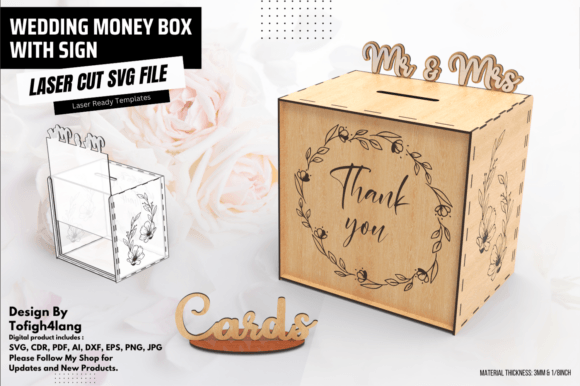
This digital file provides the vector paths needed to cut and engrave a money box out of materials like plywood, acrylic, or MDF using a laser cutter. The design typically includes slots for envelopes, a removable lid or opening, and an integrated sign area that can be personalized with the couple’s names, wedding date, or a short message. The SVG file is ready to use with machines such as Glowforge, Boss Laser, or any traditional laser engraver that accepts vector files. The result is a physical box that can be painted, stained, or left natural, making it a versatile addition to any wedding table.
Because it is a digital product, the file can be downloaded instantly and used repeatedly. This makes it an appealing option for those who want to create multiple boxes for different events, or for makers who plan to sell finished boxes to engaged couples.
Who Benefits from This Digital Design?
The Wedding Money Box with Sign, Laser Cut file has a wide audience, but different people will approach it with unique goals and priorities. Understanding where you fit can help you decide whether this file meets your needs.
DIY Brides and Grooms
For couples planning their own wedding, adding handmade elements saves money and creates deeply personal keepsakes. A laser-cut money box is a weekend project that results in a professional-looking piece. You can customize the sign with your names and a phrase like “Thank You for Your Gift” or “Cards & Wishes.” Because the SVG file is pre-designed, you don’t need to be a graphic designer—just load the file, set your laser settings, and cut. Beginners should pay attention to the software scaling warning (more on that later) to ensure the box pieces fit together correctly.
Laser Cutting Hobbyists
If you own a laser cutter and enjoy making projects for friends or personal use, this file gives you a ready-to-use design that produces a satisfying, functional result. Hobbyists often value flexibility and creativity: you can experiment with different materials—walnut plywood for a rustic look, clear acrylic for a modern feel, or colored MDF for a pop of hue. You might also adjust the engraving depth or add decorative cutouts around the sign. The design’s layered construction allows for a high level of customization without starting from scratch.
Small Business Owners and Creators
Selling finished wedding money boxes can be a profitable niche. Many couples prefer to buy a ready-made box rather than make one. For a small business owner, this SVG file becomes a commercial asset. You can produce several boxes in a batch, differentiate them by offering multiple sign options or add-on bows, and sell them at bridal fairs, on Etsy, or through local wedding planners. The commercial value is high because the design is professional and the materials cost is low relative to the final product’s perceived worth. Just ensure you check the file’s license—many digital designs permit commercial use, but it is always wise to confirm.
Educators and Workshop Leaders
Teaching a laser cutting class? A project like the wedding money box offers learning value for students. It covers essential skills: loading an SVG file, understanding layer colors for cut vs. engrave, accounting for kerf (the width of the laser beam), and assembling interlocking tabs. The built-in 3 cm x 3 cm red reference square is a practical tool to teach scaling awareness—students learn why disabling automatic scaling is crucial for a precise fit. The resulting box is a tangible, giftable object that builds confidence in new makers.
Key Considerations When Using the SVG File
Different users will prioritize different aspects of this product. Here is a breakdown of what matters most for various scenarios.
Ease of Use for Beginners
Laser cutting newcomers often worry about compatibility and setup. This SVG file is straightforward—open it in Adobe Illustrator, Inkscape, LightBurn, or Glowforge’s interface. The design layers are clearly labeled (cut lines vs. engrave lines). However, the most critical point is the automatic scaling feature found in many design programs. Some software tries to fit the file to the workspace size, which would change the 3 cm x 3 cm red square and cause the box pieces to misalign. Beginners should immediately check the import settings and disable any “fit to page” or “auto-scale” options. If you are unsure, the product description encourages you to reach out for direct assistance—a helpful safety net.
Cost and Value
Compared to buying a pre-made wedding money box from a boutique shop (often $40–$80), purchasing the digital file is significantly cheaper—typically $5–$15. You also gain the ability to make multiple versions. For a small business, the file pays for itself after a single sale. For a hobbyist, the material cost for one box may be under $10, making it a low-risk project.
Quality and Precision
The quality of the final box depends on your laser cutter’s calibration and the material you choose. The SVG file itself is designed with clean geometry, appropriate tab widths, and a balanced layout. The inclusion of the reference square is a mark of thoughtful design: it ensures that even if your software misbehaves, you have a known dimension to check. When cut correctly, the box should assemble with snug joints that hold securely without glue (though glue can be added for extra strength).
Flexibility and Customization
The “sign” part of the design is typically an engraved area. You can replace the placeholder text with any wording you like. The box itself might also include decorative cutouts for lace, ribbon, or flowers. Because it is a vector file, you can resize elements (proportionally) to suit larger or smaller boxes—but be careful not to alter the thickness of tabs. Experienced users can merge the design with other files or add their own engravings.
Commercial Potential
If you plan to sell finished boxes, time is money. The SVG file’s efficiency allows you to produce a box in a single laser job (maybe 10–20 minutes depending on material thickness and engraving detail). The consistent quality means you can replicate the same design over and over. Many sellers offer customization: they ask the buyer for names and dates, edit the file, then cut and assemble. This adds a personal touch without requiring custom design work each time.
Learning Opportunities
Educators and self-taught makers will find that assembling a money box teaches structural thinking. Why do tabs need a certain width? Why does the sign need to be engraved instead of cut through? The file also introduces the concept of material-specific settings—different woods require different power and speed. Students can experiment with finishing techniques: sanding, applying oil, or painting the engraved letters.
How to Ensure a Perfect Cut
The most common pitfall users report is the automatic scaling issue. When you open the SVG in some software, it may stretch or shrink the design to fit the artboard. To avoid this, follow these steps:
- Open the file in your preferred design software.
- Locate the red reference square that measures exactly 3 cm x 3 cm.
- Use the software’s measurement tool to verify its dimensions. If it is not 3 cm, do not proceed—adjust the scale.
- Disable any “fit to page,” “fit to canvas,” or “auto-scale” options in the import or document settings.
- If you are using LightBurn, ensure you import with “Scale to fit” unchecked.
- If using Glowforge’s interface, verify that the SVG’s canvas size matches the design’s intended dimensions (commonly around 12 x 12 inches or smaller).
If you still have trouble, the product offer includes direct support. Reaching out quickly saves material and frustration.
Beyond scaling, pay attention to the laser settings. If the box pieces are cut too deeply or with too much power, the tabs may become loose due to kerf. Run a test on scrap material with the same thickness. Many users keep a log of optimal settings for different woods (e.g., 3 mm birch plywood: speed 300 mm/s, power 80% for cut, lower power for engrave).
Is This File Right for Your Project?
To decide whether the Wedding Money Box with Sign, Laser Cut SVG matches your goals, consider your skill level and intended outcome:
- You are a complete beginner: Yes, if you are willing to read instructions carefully and test the scaling. The design is forgiving, and the support offered is a safety net. The result will be impressive and build your confidence.
- You are a seasoned laser user: Absolutely—this file saves hours of drafting and leaves room for customization. You can modify the sign, add filigree, or even combine it with other elements.
- You want to sell the finished product: The file is a solid investment. Its design appeals to a wide market, and the ability to personalize signs gives you an edge over generic boxes.
- You need a quick, one-off box: Downloading this file is faster than designing from scratch. Just pay attention to the scaling, and you will have a beautiful box ready in an afternoon.
- You are teaching a class: The project is ideal because it covers the core concepts of laser cutting in a single, satisfying build. Pair the lesson with a discussion on SVG structure and kerf compensation.
Ultimately, the Wedding Money Box with Sign, Laser Cut SVG file bridges the gap between a handmade wedding touch and modern digital fabrication. It respects the craft of laser cutting while remaining accessible to non-designers. Whether you are creating for yourself, for profit, or for learning, this file delivers a reliable, attractive result that will be admired on the big day—and remembered long after.